| Command | Description |
|---|---|
| Start | Start the application with the Retain Variables. |
| Cold Start | Start the application with the initial settings |
| Stop | Stop the application |
| Option | Set parameters for the KAS Simulator application (see explanations below) |
| Exit | Leave KAS Simulator application |
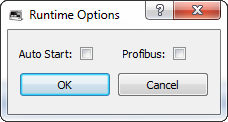
Option
Figure 6-9: Options for KAS Simulator
| Option | Description |
|---|---|
| Autostart | Autostart the application when KAS Simulator is launched. Autostart mode is recommended when a system is in production. |
| with Retain Variables | Autostart the application with the Retain Variables. When this option is selected, all retain variables are saved in NVRAM before the application is closed. This option is needed to correctly recover variables when restarting the application. |
| Profibus | If there are Profibus"Process Field Bus" Profibus is the most popular type of fieldbus (see Fieldbus entry in the glossary) used worldwide slave devices (e.g. WAGO I/O slices) in your system, this flag should be enabled to make the fieldbus active. |
Parameters are saved in the Options.bin file located under:
<user>\AppData\Local\Kollmorgen\KAS\Sinope Simulator\Resources\
 Options are slightly different for the AKC (PAC)
When the KAS RuntimeIn computer science, runtime (or run-time) describes the operation of a computer program, the duration of its execution, from beginning to termination (compare compile time). Within KAS, runtime also refers to the virtual machine that manage the program written in a computer language while it is running is downloaded on AKC (PAC"Programmable Automation Controller" PAC is a compact controller that combines the features and capabilities of a PC-based control system with that of a typical programmable logic controller (PLC). A PAC thus provides not only the reliability of a PLC, but also the task flexibility and computing power of a PC. Additionally, because they function and communicate over popular network interface protocols, PACs are able to transfer data from the machines they control to other machines and components in a networked control system) , the Option window contains an additional drop-down menu (named Main Bus DriverIn computing and electronics, a driver is a software component allowing higher-level computer programs to interact with a computer hardware device. A driver typically communicates with the device through the computer bus or communications subsystem to which the hardware is connected) that lists all the fieldbusesA Fieldbus is an industrial network system for real-time distributed control (e.g. CAN or Profibus). It is a way of connecting instruments in a plant design predefined in KAS.
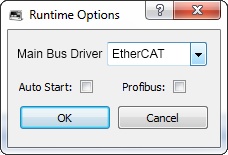
Figure 6-10: Options for KAS Runtime on AKC (PAC)
From among the fieldbuses you can select the one used as the main motion bus (master bus) so that all the motion part is synchronized on its sampling rate frequency.
| Command | Description |
|---|---|
| About | Show version numbers and other View Version Information about KAS Simulator |
|
Stay Connected with Kollmorgen       
|
Copyright © 2015 Kollmorgen™ |

|